

Revolutionizing Education in the Middle East with CMT Technologies
In the ever-evolving world of education, technology plays a crucial role in enhancing learning experiences, improving communication, and driving innovation. Digital Signage and IPTV (Internet Protocol Television) are two powerful technologies that are transforming educational institutions in the Middle East. At CMT Technologies, we provide a comprehensive solution that integrates Digital Signage and IPTV systems, creating seamless, modern, and engaging educational environments. This solution is part of our Smart Education Solutions, and it works with our OTT solutions and telecom solutions for schools and universities.
Why Digital Signage and IPTV Matter for Educational Institutions
- Enhancing Communication and Information Delivery
In schools, colleges, and universities, effective communication is vital for success. Digital Signage allows educational institutions to display real-time information on large screens across campuses. Whether it’s announcements, schedules, emergency alerts, or event reminders, Digital Signage ensures that information is instantly accessible to students, staff, and visitors. With CMT Technologies’ solutions, you can ensure that communication is clear, engaging, and up-to-date.
- Interactive Learning with IPTV Systems
IPTV systems deliver high-quality video content over the internet, making them a perfect tool for interactive and remote learning. By integrating IPTV with Digital Signage, educational institutions can stream lectures, educational videos, webinars, and live events to multiple screens across their campuses. This solution supports both in-class and remote learning, ensuring that students receive a consistent, high-quality educational experience regardless of their location.
- Cost-Effective and Scalable Solutions
CMT Technologies offers cost-effective Digital Signage and IPTV solutions tailored for educational institutions. With IPTV, educational content can be distributed over a single network, reducing the need for expensive hardware. Digital Signage, on the other hand, can be easily scaled to meet the needs of any campus, whether you’re managing a single school or a network of universities. The flexibility and scalability of these systems allow educational institutions in the Middle East to grow and adapt as technology continues to evolve.

Benefits of Digital Signage and IPTV for Educational Institutions
- Improved Student Engagement
Students today are digital natives, accustomed to engaging with technology in their everyday lives. By integrating Digital Signage and IPTV systems, institutions can keep students engaged with interactive content, live broadcasts, and on-demand video content. This dynamic approach helps maintain student interest, fosters participation, and enhances learning outcomes.
- Streamlined Administration
Managing multiple campuses or large campuses can be a logistical challenge. Digital Signage and IPTV solutions from CMT Technologies streamline the process of information dissemination. Administrators can control the content displayed across different locations from a central system, making it easier to manage announcements, events, and emergencies, all from a single dashboard.
- Flexible Content Delivery
With IPTV, educational institutions can stream educational content across various platforms, including TVs, computers, and mobile devices. This flexibility enables students to access materials from anywhere, at any time, fostering a more personalized and flexible learning experience.
- Future-Proofing Education
By adopting Digital Signage and IPTV systems, educational institutions in the Middle East are preparing for the future. These technologies are constantly evolving, and as the demand for interactive learning experiences and efficient communication grows, so does the potential of Digital Signage and IPTV. CMT Technologies provides solutions that not only meet current needs but are also scalable to accommodate future advancements.
IPTV Solution

CMT Technologies offers state-of-the-art IPTV solutions that provide high-quality content delivery for various industries. Their IPTV systems are designed to enhance user experiences with seamless streaming, customizable features, and reliable performance, whether for hotels, hospitals, or educational institutions.
Hospitality Solution

CMT Technologies provides IPTV and digital signage systems tailored for the hospitality industry. Their solutions enhance guest experiences, providing easy access to entertainment, information, and communication tools in hotels and resorts.
Healthcare Solution

CMT Technologies’ healthcare solutions offer advanced IPTV and digital signage systems to improve patient experiences. Their systems help streamline communication, entertainment, and information delivery in hospitals and healthcare facilities.
Broadcasters Solution

CMT Technologies delivers specialized broadcaster solutions, enabling seamless content delivery and management. Their solutions are designed to support large-scale broadcasting operations, enhancing performance and user experience.
Telecom Solution

CMT Technologies offers robust telecom solutions designed to optimize communication networks and enhance connectivity. Their systems provide high-performance services, tailored to meet the demands of modern businesses and telecom providers.
OTT Solution
CMT Technologies provides cutting-edge Over-The-Top (OTT) solutions that allow broadcasters to deliver high-quality video content across various platforms. Their OTT services ensure seamless streaming and user-friendly interfaces for a global audience.
Conclusion
Digital Signage and IPTV systems are revolutionizing the education sector in the Middle East, offering new opportunities for communication, learning, and administration. With CMT Technologies, educational institutions can leverage the power of these technologies to create engaging, modern, and scalable environments that cater to the needs of both students and staff.
Transform your educational institution today with CMT Technologies’ Digital Signage and IPTV complete solution. Enhance learning, improve communication, and prepare for the future of education.
One Platform for Signage, Live TV and Learning Video
Digital signage and IPTV for education works best on one platform. That means one system controls screens, live TV, recorded lessons and alerts. Staff do not need two separate systems. They log in once. They plan content once. They send it to every screen.
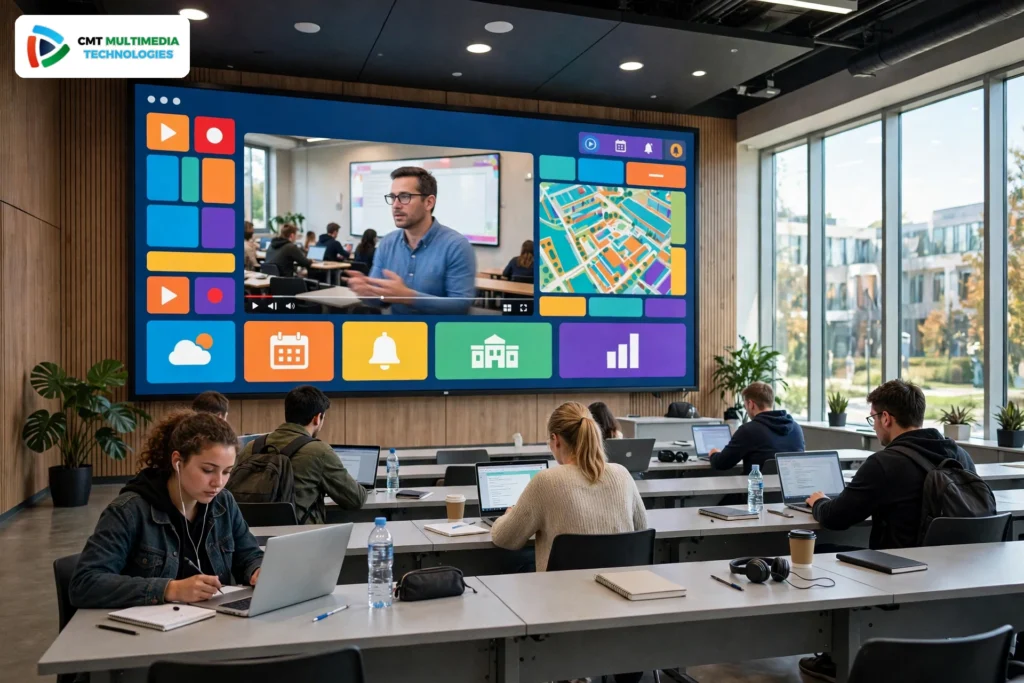
Digital signage for schools shows announcements, class times, exam notices and event news. IPTV for schools shows live TV, lectures and learning videos. Together, they give students clear facts in every room. A digital signage display in a hallway can show a timetable in the morning and a live event in the afternoon. The same screen can switch in seconds.
What is the purpose of digital signage? Its purpose is simple. It shares the right message at the right time. It helps students know where to go and what to do next. It helps teachers share news without paper notes. It helps leaders share campus news in a clear way.
What digital signage software is best for schools?
The best digital signage software for schools is simple to use. It has one dashboard for all screens. It lets staff plan content by day and by time. It works with most screens. It supports Arabic and English. It gives clear roles, so a teacher can update one room and an admin can update the whole campus. It also works with IPTV, so live video and signage share one screen.
CMT Technologies builds, deploys and supports enterprise IPTV and OTT systems for schools and universities. The team sets up the system, tests it on campus, and supports staff after launch. That is the core of digital signage content management for education.
IPTV on Campus: Live TV, Lecture Capture and Video on Demand
IPTV for education brings live TV and learning video to the classroom screen. Teachers can show a live news program, a science event, or a sports match for a school event. Students in the back row can see and hear clearly, because the sound and picture come from one clear source.
Can you watch TV on digital signage? Yes. A digital signage display can show live TV when the school wants it. It can show a scheduled channel at break time. It can then return to announcements and timetables. One screen can do both jobs, so the school does not need a TV and a sign in the same room.
Lecture capture records a lesson as it happens. Video on demand lets students watch that lesson later. A student who missed a class can catch up. A student who wants to review a hard topic can watch it again. Teachers can share short videos by subject, class, or year group.
For universities, this matters even more. A large lecture hall can share one stream to overflow rooms. A IPTV system for universities in the Middle East can serve many halls at the same time, with clear sound and stable video. That is why IPTV solutions for education work well on large campuses.
Lecture Streaming and Recording, and How It Works with Your LMS
Lecture streaming sends a live lesson to screens in other rooms. It also sends it to a recording store. Teachers start the stream from the classroom. Students watch live, or they watch later from the video library.
Recording is simple. The system records the teacher, the slides, and the sound. The file is saved with the lesson name, date, and subject. Staff can trim the start and end. They can add a short title and a short note.
The system works with the LMS that the school already uses. It works with Moodle, Blackboard, and Google Classroom. A teacher can add a lesson link in the LMS. A student clicks the link in the LMS and watches the video. Grades, groups, and class lists stay in the LMS. The video system only adds the stream and the recording.
This link between video and the LMS saves time. Teachers do not upload files by hand. Students do not search many apps. They find the lesson where they already learn.
Emergency Alerts and Campus Safety
One message on every screen can keep a campus safe. In an emergency, staff can send an alert to all screens at once. The alert can show in Arabic and English. It can show simple steps, such as where to go and what to do.
Alerts can go to entrance screens, hallway screens, classroom screens, and cafeteria screens. They override normal content. They stay on screen until staff clear them. They can also work with a bell or a public address system, so the message is seen and heard.
Staff can plan alert templates in advance. They can test them in a drill. They can set roles, so only trained staff can send a live alert. After an event, they can review the log and see when the alert was sent.
Safety is not only for fire or weather. It also covers a lockdown, a lost child, a road closure, or a health notice. Clear screens help calm students and guide them fast.
Wayfinding, Timetables and Exam Schedules That Update Themselves
New students often get lost on a large campus. Wayfinding screens show a simple map, a list of rooms, and the way to each hall. A student taps a room name and sees the route. Visitors can find the office, the library, and the sports hall with no help.
Timetables can update themselves. The system reads the school information system, or SIS, and the calendar. When a class moves to a new room, the screen shows the new room. When an exam time changes, the exam screen shows the new time. Staff do not need to print new sheets and walk the halls.
Exam schedules need clear facts. A screen can show the exam name, the room, the start time, and the seat plan. It can show a countdown before the exam starts. It can change to a quiet notice during the exam.
This link to the SIS and the calendar is a key part of campus digital signage. It cuts errors. It cuts paper. It gives students facts they can trust.
A Screen Map for the Whole Campus
Every place on campus has a job for its screen. A screen map plans what each screen shows and where its facts come from. It keeps content clear. It stops two teams from showing different facts on the same day.
| Location | Screen | Content | Data Source |
|---|---|---|---|
| Entrance | Large video wall and touch kiosk | Welcome, campus news, and prayer times | SIS, calendar, and content dashboard |
| Hallways | Wall screens near stairs and lifts | Class times, room changes, and events | SIS and calendar |
| Classrooms | Classroom screen or smart TV | Lessons, live TV, and recorded video | LMS, IPTV headend, and teacher input |
| Cafeteria | Menu boards and wall screens | Menu items, lunch times, and notices | Catering plan and content dashboard |
| Library | Quiet screens near the desk | Opening hours, study tips, and events | Library system and calendar |
| Sports | Hall and gym screens | Fixtures, results, and training times | Sports schedule and content dashboard |
| Dorms | Common room screens | Notices, events, and safety messages | Housing office and content dashboard |
School digital signage works best when each screen has one clear job. The map above is a good start. A school can add more places later, such as a clinic, a prayer room, or a bus stop.
How the System Fits Together: Headend, Network and Screens
The system has three parts. The headend, the network, and the screens. The headend takes in live TV, recorded video, and signage content. It turns each stream into a form that screens can play. It also stores recorded lessons for video on demand.
The network carries the streams to each room. A strong campus network is key. It must give enough speed for many screens at the same time. Wired links work well for fixed screens. Wi-Fi works for mobile screens and small rooms. The team tests the network before launch, so video stays clear at peak times.
The screens are the last part. They can be smart TVs, large video walls, or older screens with a set-top box. A small player sits near each screen. It plays the signage, the live TV, or the recorded lesson. Staff control it from the dashboard, with no need to visit the room.
In simple terms, the headend makes the content, the network carries it, and the screens show it. One dashboard controls all three parts.
Schools vs Universities: What Changes
Schools and universities share the same idea, but the scale changes. A school has fewer rooms and one main timetable. A university has many faculties, many halls, and many timetables. University digital signage must group screens by faculty, building, and campus.
For K-12 schools, safety and simple messages matter most. Parents need clear pickup notices. Young students need simple words and large text. Teachers need one screen that shows the lesson and the class plan.
For universities, research news, guest lectures, and career events matter more. Students move between buildings. Wayfinding and live lecture streams help them reach the right hall on time. An IPTV system for schools can grow into a university system, with more channels, more storage, and more user roles.
The rollout also changes. A school can start with one building. A university can start with one faculty, then add the rest in steps. Both need training, clear roles, and a simple plan for content.
Built for the Gulf: Arabic and English, Prayer Times and Multi-Campus Control
Education IPTV in the Gulf must work in Arabic and English. Screens can show both languages at once, or switch by time and place. Arabic text must read right to left, with clear fonts and large sizes. English text must be simple and short.
Prayer times are a daily need. Screens can show the next prayer time, with a calm notice before it starts. They can pause a video or lower the sound at prayer time, then return to normal content after.
Many schools in the Gulf have more than one campus. Multi-campus control lets one team manage all campuses from one dashboard. Each campus can show its own news, but it can also share a central alert. A head office can set the brand, the layout, and the rules. A local admin can update local news and timetables.
Local support matters too. The system must work in heat, dust, and busy halls. It must work with local channels and local calendars. CMT Technologies builds for these needs, with teams that know the region.

Signage-Only vs IPTV-Only vs Combined: Which One Fits Your Campus?
Some schools start with signage only. Some start with IPTV only. Many choose the combined solution, because it does both jobs on one platform. The table below shows the difference in simple terms.
| Feature | Signage-Only | IPTV-Only | Combined Solution |
|---|---|---|---|
| Main job | Shows notices and timetables | Shows live TV and video | Shows both, on one screen |
| Live TV | No | Yes | Yes |
| Recorded lessons | No | Yes | Yes |
| Announcements and timetables | Yes | Limited | Yes, with live updates |
| Emergency alerts | Yes, on all screens | Limited | Yes, on all screens at once |
| Video on demand | No | Yes | Yes |
| One dashboard | Yes, for signage | Yes, for video | Yes, for signage and video |
| Best for | Simple notice boards | Video-first classrooms | A full campus, on one platform |
The combined solution fits most campuses. It gives one login, one dashboard, and one support team. It also grows with the school, so new screens and new channels can join later.
A Step-by-Step Rollout Plan
A good rollout moves in small steps. Each step has a clear goal. The plan below is a simple timeline for one campus.
Step 1, Discover, in weeks one and two. The team visits the campus. It maps rooms, screens, and the network. It talks with teachers, admins, and IT staff. It lists what the school needs first.
Step 2, Design, in weeks three and four. The team plans the screen map, the channels, and the content plan. It plans the headend, the network, and the screen list. It agrees on roles, languages, and alert templates.
Step 3, Build, in weeks five and six. The team sets up the headend and the network. It tests live TV, recording, and signage. It links the SIS, the calendar, and the LMS.
Step 4, Install, in weeks seven and eight. The team installs screens and players in each room. It tests each screen with real content. It fixes any weak network links.
Step 5, Train, in week nine. The team trains teachers and admins. It shows how to plan content, send alerts, and record lessons. It gives a short guide for daily tasks.
Step 6, Launch and support, in week ten and after. The campus goes live, one building at a time if needed. The team watches the system, fixes issues, and adds new screens in later steps.
Large universities can repeat these steps by faculty or by campus. That keeps the launch calm and clear.
Cost Factors and Return on Investment vs Printing
Cost depends on many factors, not on one fixed amount. The main cost factors are the number of screens, the type of screens, the network work, the headend and storage, content design, training, and support. A small school with a few screens has fewer factors than a large university with many halls.
Other factors are the number of channels, the hours of recorded video, and the number of campuses. Arabic and English content, prayer time feeds, and wayfinding maps also shape the plan. A clear plan at the start helps the school choose what to launch first and what to add later.
Return on investment vs printing is easy to see in factors, not in amounts. Printing needs paper, ink, and staff time for every change. A printed timetable is out of date when a class moves. A screen update takes seconds, with no reprint and no walk to each hall.
Screens also save time for staff. One admin can update all screens from one dashboard. Teachers do not need to print notes for each room. Students see the same facts on every screen, so they ask fewer questions at the office.
Over time, the system also supports learning. Recorded lessons help students review. Live streams help more students join a lecture. Clear alerts help keep the campus safe. These gains are the real return for a school or a university.

Connect with CMT Technologies
Contact us via our website to schedule your personalized demonstration.
Contact on Whatsapp
+971-504441830
Say Hello
sales@cmt-technologies.com
Social Just You Connected Us!
Demo
Frequently Asked Questions
What is digital signage in schools and universities?
Digital signage shows announcements, class schedules, event notices and learning videos on screens across the campus.
How does IPTV help in classrooms?
IPTV shows live lectures, recorded lessons and learning videos on the classroom screen, so every student can see and hear clearly.
Can the same system show announcements and class schedules?
Yes, announcements, class schedules and exam notices can be shown on every screen from one dashboard.
Does it work with the screens already installed in our school?
Yes, it works with most smart TVs and older screens with a set-top box, so there is no need to replace all screens.
Can teachers manage all campus screens from one place?
Yes, one dashboard controls all campus screens, including content, schedules and announcements.
